
For dispatchers and owners with 21–50 drivers
Driver online status on Uber and Bolt: who is driving, who is waiting, who went offline?
Fahrerstatus shows for every driver whether they are on a trip, available, on a break or offline – Uber and Bolt in one list. Each shift becomes a timeline with its status history. That timeline drafts the timesheet, and gaps between online time and recorded working time are flagged before they cost wages or surface in an inspection.
- F-01 · KemalOn trip
- F-02 · SvenjaAvailable
- F-03 · DariuszBreak
- F-04 · AhmadOffline in shift
- F-05 · LenaOn trip
- F-06 · MirkoOffline · shift over
What statuses does a driver have in the Uber and Bolt apps?
For dispatch, four states matter. If you see them for every driver in one list, you know without a phone call who can take the next request and where a shift has stalled. Each platform shows this only for its own account, so with 30 drivers on two apps you lose the overview unless the data is merged.
- On trip
- The driver has accepted a job: driving to the pickup or carrying a passenger.
- Available
- The driver is online and waiting for a request. Long available stretches show idle time in a shift.
- Break
- The rest break logged on the timesheet. Under § 2 ArbZG it does not count as working time.
- Offline
- The driver is logged into neither app. Normal outside the shift; inside the shift, a reason to ask.
In short
- Status board: all drivers from Uber and Bolt in one list, with colour and text.
- Status history: every shift as a timeline, traceable minute by minute.
- Check: online time against the timesheet, with differences flagged.
- Data protection: only data needed for dispatch and working time, agreed with the works council and data protection officer.
Is online time in the Uber app the same as working time?
No, not automatically. Under § 2(1) ArbZG, the German Working Hours Act, working time runs from the start to the end of work, excluding rest breaks. A driver can be working while offline (refuelling, cleaning the car) and online without the time appearing on the timesheet. That is why comparing the two pays off.
| Aspect | Online time (app) | Working time (timesheet) |
|---|---|---|
| Source | Uber Fleet and Bolt Fleet | Your records under § 17 MiLoG |
| Includes | On trip and available | Start to end of work, excluding rest breaks |
| Legal duty | none | Record start, end and duration by day 7, keep for 2 years |
| Used for | Dispatch, utilisation, cross-check | Pay, minimum wage, customs (Zoll) inspections |
The obligations behind this are clear. Under § 17(1) MiLoG (Minimum Wage Act) you must record start, end and duration of daily working time by the end of the seventh calendar day after the work and keep the records for at least two years; this explicitly covers the sectors listed in § 2a SchwarzArbG, which include passenger transport. Under § 4 ArbZG, a shift of more than six and up to nine hours needs at least 30 minutes of breaks, over nine hours 45 minutes, and nobody may work more than six hours in a row without a break. And every hour worked costs at least the minimum wage: €13.90 gross since 1 January 2026, €14.60 from 1 January 2027 (German legal figures, § 1 MiLoV5).
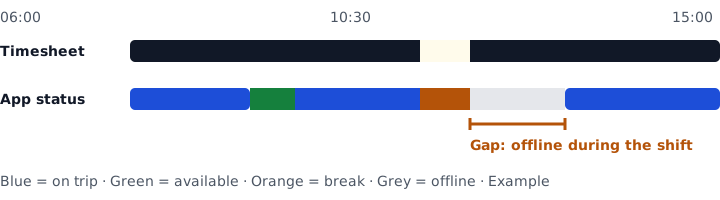
What does it cost when online time and timesheets drift apart?
Every hour on the timesheet with no app online time is paid at least the German minimum wage of €13.90, with no revenue against it. The reverse is a risk too: online time missing from the timesheet means incomplete records and possibly an hourly rate below the minimum wage.
| Item | Duration |
|---|---|
| Shift on the timesheet, 06:00–15:00 | 9 h 00 min |
| Logged rest break | − 45 min |
| Working time | 8 h 15 min |
| Online on Uber or Bolt (on trip + available) | 6 h 40 min |
| Offline during working time | 1 h 35 min |
| of which explained: refuelling and car care | − 25 min |
| Unexplained gap | 1 h 10 min |
1 h 10 min at the €13.90 minimum wage is €16.22 in wages for one shift. Repeated on five days, that is 5 h 50 min and €81.08 a week – for a single driver. In a fleet of 30 drivers such patterns rarely stand out without a timeline, because nobody recalculates every shift by hand. All figures are a fictional example; employer social contributions are not included.
What should you do when a driver goes offline during a shift?
Ask, document, then decide. An offline gap is a question, not proof. The most common reasons are harmless. What matters is that you see the gap the same day, not at payroll time.
Spot the gap
Fahrerstatus flags every offline stretch during a shift that exceeds your threshold, with time and length.
Find the reason
The dispatcher asks: refuelling, car wash, workshop, direct booking, app trouble or a forgotten break? The reason is noted on the gap.
Correct the timesheet
If a break is missing or the driver finished early, the timesheet is adjusted and approved. If gaps keep going unexplained, have a factual conversation.
If you suspect a criminal offence, such as trips taken outside the apps, data protection law sets tight limits (see the next section). The timeline gives you a reason to ask, not a verdict.
Are you allowed to monitor your drivers' activity?
Yes, but only to the extent necessary and transparently. Your employed drivers' status data is employee data. If you analyse it, you need to define purpose, scope and retention, inform the drivers and, where one exists, involve the works council (Betriebsrat).
What the law says
§ 26(1) BDSG, the Federal Data Protection Act, permits processing employee data where it is necessary to carry out the employment relationship. Data to uncover criminal offences may only be processed if documented facts give rise to a suspicion and the processing is not disproportionate. Consent is a weak basis: under § 26(2) BDSG, the employee's dependence must be taken into account when judging whether consent is voluntary.
Works council and data protection officer
The works council has a right of co-determination over technical systems designed to monitor employees' behaviour or performance (§ 87(1) no. 6 BetrVG). You must appoint a data protection officer, among other cases, if as a rule at least 20 people are constantly involved in the automated processing of personal data (§ 38(1) BDSG).
Checklist before you start
- Define the purpose in writing: dispatch, working-time records, pay – not permanent surveillance.
- Analyse only what is necessary: status and times rather than full location histories.
- Inform drivers in writing beforehand what is recorded and who can see it.
- Involve the works council if one has been elected; a works agreement creates clarity (§ 26(4) BDSG).
- Bring in your data protection officer and set retention periods.
- Limit access: dispatchers see status, payroll sees timesheets.
This overview is not legal advice. Have your data protection officer or an employment lawyer check the legal basis for your business.
Which features show driver status?
Six building blocks work together: from the status right now, through the history of the shift, to a finished timesheet.
Status board
All drivers from Uber and Bolt in one list: on trip, available, break, offline. Sorted by status, with time spent in the current state.
Shift timeline
Each shift's status history as a coloured bar. You see at a glance when the driver drove, waited or took a break.
Flagged gaps
Offline gaps during shifts, missing breaks under § 4 ArbZG and online time outside the timesheet are flagged.
Automatic timesheets
Activity data drafts start, end and breaks. The dispatcher reviews, the driver confirms, payroll takes over.
Real hourly pay
Revenue and wages per hour worked for each driver, so you see which shifts pay for themselves.
Ride request forwarding
Orders from direct customers go to the driver the board shows as available.
How quickly is the status board set up?
In about 48 hours. You need no hardware and no new driver app; the data comes from the fleet accounts you already have on Uber and Bolt.
Add drivers and vehicles
Upload as a list or one by one. Each driver is matched to their Uber and Bolt profile.
Connect Uber Fleet and Bolt Fleet
Status, trips and revenue then flow in automatically, for both platforms in one view.
Set shifts and rules
Enter shift times, break rule and the threshold for gaps. The board, timelines and timesheets are then ready.
What does checking status deliver in practice?
More than 700 Mietwagen and taxi operators run their drivers, vehicles and platform data on the software behind Fahrerstatus instead of Excel sheets and WhatsApp groups.
What does Fahrerstatus cost?
from $5.99 per driver/month
For 30 drivers that is from $179.70 a month.
- Status board and timelines for Uber and Bolt
- Automatic timesheets with approval
- Flagged gaps and missing breaks
- Setup in about 48 hours, 2-day free trial, no credit card required
Frequently asked questions about driver online status
How can I see which of my Uber drivers are online right now?
The Uber and Bolt fleet accounts each show only their own platform, so a fleet on both apps has to compare two views. Fahrerstatus merges them: every driver gets one row with a status (on trip, available, break or offline) and a timeline of the current shift.
Is online time in the Uber app the same as working time?
Not automatically. Under § 2 ArbZG (German Working Hours Act), working time runs from the start to the end of work, excluding rest breaks, and can include offline tasks such as refuelling or cleaning the car. Online time is therefore a reference value, not a replacement for the records required by § 17 MiLoG. An employment lawyer can assess your specific case.
What should I do when a driver goes offline during a shift?
Ask first, don't assume. Offline gaps often have harmless reasons: refuelling, a car wash, a direct booking, an unlogged break. Fahrerstatus flags the gap with time and length so the dispatcher can clear it the same day. If unexplained gaps keep recurring, you have a factual basis for a conversation.
Am I allowed to monitor my drivers' activity in Germany?
Only as far as the employment relationship requires. § 26 BDSG (Federal Data Protection Act) permits processing employee data needed to carry out employment; data to uncover criminal offences only with a documented suspicion. If there is a works council, it has a say on technical systems meant to monitor behaviour or performance (§ 87(1) no. 6 BetrVG). Involve your data protection officer early.
Are Uber drivers in Germany paid for online time or working time?
Employed drivers are entitled to at least the statutory minimum wage for every hour worked: €13.90 gross since 1 January 2026 and €14.60 from 1 January 2027 (German legal figures, § 1 MiLoV5). What counts is working time, not app online time. Comparing both shows whether your timesheets are complete.
How long must I keep my drivers' working-time records?
Start, end and duration of daily working time must be recorded by the end of the seventh calendar day after the work and kept for at least two years (§ 17(1) MiLoG). This applies to passenger transport, among other sectors. Fahrerstatus drafts the timesheets from activity data; the dispatcher reviews and approves them.
What does Fahrerstatus cost and how fast is setup?
Fahrerstatus costs from $5.99 per driver per month. Setup takes about 48 hours: upload drivers and vehicles, connect Uber Fleet and Bolt Fleet, set shift rules. You can try it free for 2 days, no credit card required.
Next step
Your status board with real fleet data
Using your own Uber and Bolt accounts, we show you what the board looks like for your drivers and which gaps between online time and timesheets currently go unnoticed.
- 1We get back to you this week.
- 2A short call about driver count, shift pattern and works council.
- 3Setup in about 48 hours.
Send your request
Leave your details — we'll be in touch this week.